Shopper Resource
CHECK MY PAYMENT
Check the status of a payment or find out when you’ll get paid
Shopper Resource
Check the status of a payment or find out when you’ll get paid
The steps are different for each one. Pick yours to get started.
GIGSPOT
Submit your inquiry using the form on this page
SHOPMETRICS
Submit your inquiry from the My Pay page
01
The My Pay page isn’t available in Gigspot, so use the form at the bottom of this section.
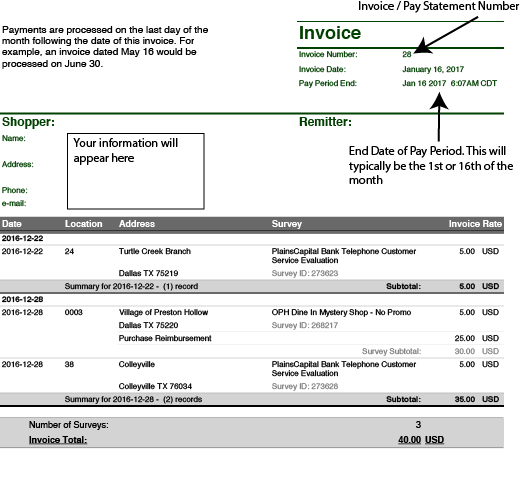
Step 1 — Find your Pay Statement number
Step 2 — Submit your inquiry
Fill out the form below. Include your Pay Statement/Invoice number so we can match your inquiry to the right payment.
If your question is about one specific shop, include the Job ID and visit date — without them we can’t look up the shop, and your answer will take longer.
02
Submit your inquiry from the My Pay page. Your pay statement is attached automatically, so this is the fastest way to get an answer.
If your question is about one specific shop, include the Job ID and visit date — without them we can’t look up the shop, and your answer will take longer.
03
This applies to both platforms.
Your payment date is based on the End Date listed on your Pay Statement/Invoice. For example, a pay statement with an End Date of May 16 is processed on June 30.
Once processing begins, funds typically arrive in your bank account within 2–4 business days, depending on your financial institution.

© 2026 Sentry Shoppers. Sentry Insights All Rights Reserved. Site Map